
How to Monitor a VPN Server Fleet (Before Users Tell You It's Down)
VPN nodes fail in ways your users notice before you do. A server gets its IPs blocked in one country while working fine everywhere else. A certificate expires. A node pins its CPU at 100 percent under load and quietly drops connections. None of these trip a basic “is the port open” check, and all of them generate support tickets and churn before anyone on your team realizes something is wrong.
We build and operate VPN infrastructure, and monitoring is the part founders underestimate most. This guide covers what to actually monitor on a VPN fleet, why VPN monitoring is different from generic uptime monitoring, and how to set up alerting that reaches you before your users do. Full disclosure up front: monitoring is also what our own product, TunnelHQ, does, so we will be clear about where it fits and where you have other options.
Why VPN Monitoring Is Different
Generic uptime monitoring answers one question: is the server responding? For a VPN fleet, that question is almost useless on its own. A VPN node can pass a ping and a port check while being completely unusable for your customers.
Here is the gap. A VPN server’s job is to carry a specific protocol’s traffic, from a specific place, without being blocked. So the questions that actually matter are:
- Can a real client connect through the protocol you offer (WireGuard, OpenVPN, VLESS, and so on), not just reach the port?
- Does it work from the regions your users are in, not just from your data center?
- Is the connection leaking DNS or the real IP?
- Is the certificate valid, and not days from expiring?
- Is the node healthy under load, or saturated?
A port check answers none of those. VPN monitoring has to actually attempt the connection, the way a user would, from where a user is.
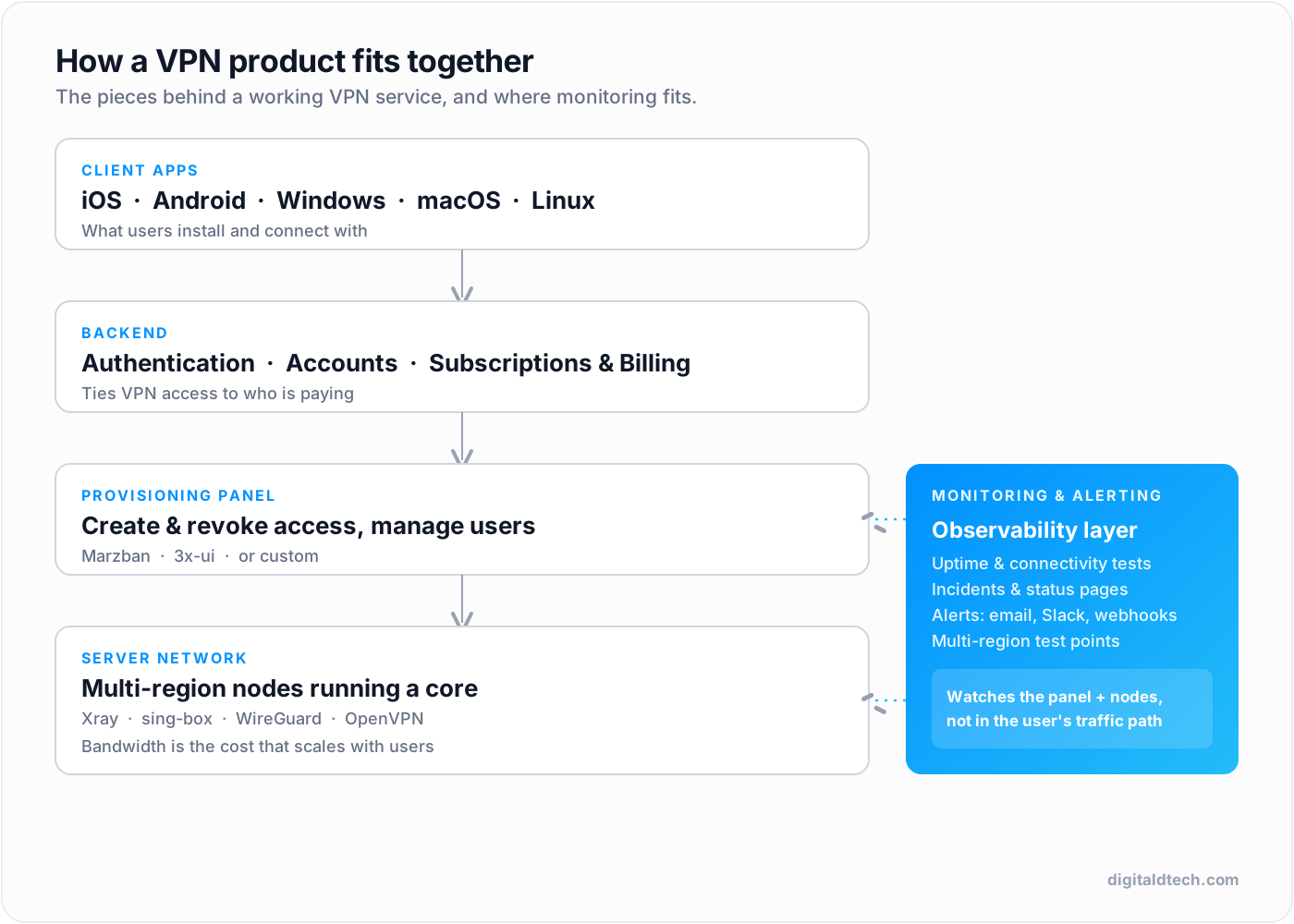
Monitoring sits to the side of your stack. It is not in the user’s traffic path (it should never be a bottleneck or a privacy concern), but it watches the panel and the nodes and tells you when something breaks.
What to Monitor on a VPN Fleet
Per-protocol connectivity, not just reachability
The core check is a real connection attempt over the protocol you serve. If you offer WireGuard and VLESS, you test that a client can establish a WireGuard tunnel and a VLESS connection to each node, and pass traffic, not just that the host answers. This is the single most important difference between VPN monitoring and uptime monitoring, and it is the check that catches the failures users actually feel.
Multi-region checks (this is non-negotiable for censored markets)
A VPN node can be perfectly healthy and still be blocked for half your users. Censorship is regional and changes over time, so a node that works from Europe can be blocked from Iran or China the same day. If you serve those markets, you need test points in or near those regions, because a check from your own infrastructure will report green while real users are cut off. Community reports repeatedly show mainstream setups working in one place and failing in another, which is exactly the failure a single-location monitor misses.
This regional reality is also why obfuscation work is never finished. Server IPs get flagged and need rotation, and only multi-region monitoring tells you which nodes are blocked where, so you know what to rotate.
Leak checks
A VPN that leaks the user’s DNS queries or real IP has failed at its one job, silently. Monitoring should periodically verify that traffic through the tunnel does not leak DNS or expose the origin IP. A leak is worse than an outage, because the user does not see it and keeps trusting a product that is not protecting them.
Certificate and expiry monitoring
Protocols that present a TLS certificate (and anything fronting HTTPS) will hard-fail when a cert expires. Expiry is the most avoidable outage there is, and it still happens constantly because nobody is watching the dates. Monitor certificate validity and expiry windows so you get a warning weeks ahead, not a outage on renewal day.
Capacity: the 100% CPU trap
A node can be “up” and still be unusable because it is saturated. This is a well-documented failure mode in the VPN panel ecosystem: operators report nodes pinning CPU at 100 percent under load, and panels miscounting node and user usage until restarted (see, for example, Marzban issue #1305 and #1199). A 10 Gbps server with one core and a gigabyte of RAM will never reach its advertised throughput. Monitor CPU, memory, and connection counts per node so you can see saturation coming and add capacity before users feel it.
How to Set Up VPN Monitoring
You have three broad options, in increasing order of fit for a real fleet.
Option 1: Roll your own scripts
You can write cron jobs that attempt connections and ping a dead-man’s-switch service. This is fine for one or two nodes and a hobby project. It falls apart at fleet scale: no history, no multi-region test points, no incident tracking, and you end up maintaining a monitoring system instead of your product.
Option 2: Generic uptime tools
Tools like the open-source uptime monitors are excellent at HTTP, TCP, ping, and DNS checks, and you should use them for your general infrastructure (website, API, dashboards). Their limitation for VPN is that they check reachability, not protocol-level connectivity, and they usually test from one place. They answer “is the server up,” not “can my users actually connect through VLESS from Iran.”
Option 3: VPN-aware monitoring
A VPN-aware platform does the connection attempt over the actual protocol, from multiple regions, and tracks incidents and history. This is what a real fleet needs, and it is the category our own product sits in.
TunnelHQ is our self-hosted VPN and infrastructure monitoring platform. It runs connectivity tests for VPN protocols (WireGuard, OpenVPN, OpenConnect, Shadowsocks, VLESS, VMess, Trojan, Hysteria2, IKEv2, AmneziaWG, and more), distributed across regions, with real-time status, incidents, public status pages, and certificate monitoring, alongside the usual HTTP, TCP, ping, and DNS checks for the rest of your infrastructure. We built it because the generic tools did not answer the VPN-specific questions above. If you would rather not run your own, that is the gap it fills. If you prefer to assemble your own from open-source pieces, the checklist in this guide still applies.
Alerting That Reaches You First
Monitoring is only useful if the alert reaches the right person fast. A few principles:
- Speed matters. A blocked node or a leak should page you in seconds, not in the next five-minute batch.
- Use the channels your team actually watches. Email is fine for summaries; for incidents, push to Slack, Telegram, or Discord where someone will see it.
- Send raw webhooks for automation. A webhook on an incident lets you trigger your own response: rotate an IP, spin up a replacement node, or open a ticket automatically. This is where monitoring stops being a dashboard and starts being part of your operations. TunnelHQ supports raw webhooks and a documented API for exactly this.
- Tune the noise. Alert fatigue is real. Set sensible intervals and thresholds so a brief blip does not page everyone, but a real outage does.
The AI Angle: Monitoring Over MCP
One newer capability worth knowing about: the Model Context Protocol (MCP) lets AI assistants connect to tools and act on them. TunnelHQ ships an MCP server (@tunnelhq/mcp) that lets MCP-compatible assistants such as Claude, Cursor, and Windsurf test VPN configs and manage monitors through the API. In practice that means you can ask an assistant to check a config, spin up a monitor, or pull the current status of a region without leaving your editor.
This is genuinely useful for VPN operations, where a lot of the work is repetitive checking and config validation. It is also an emerging area, so treat it as a productivity aid for your team, not as a replacement for alerting that pages a human when a node goes down.
A VPN Fleet Monitoring Checklist
- Per-protocol connectivity tests (a real connection, not just a port check) for every protocol you offer.
- Multi-region test points covering the markets you actually serve.
- DNS and IP leak checks through the tunnel.
- Certificate validity and expiry monitoring with advance warning.
- Capacity monitoring: CPU, memory, and connections per node.
- Incident history so you can see patterns, not just the current state.
- Fast alerts on the channels your team watches, plus webhooks for automated response.
- Status pages if you want to show customers uptime transparently.
- Monitoring kept out of the user traffic path (observability, not a proxy).
FAQ
Why isn’t a normal uptime monitor enough for a VPN?
Because a VPN node can pass a ping and a port check while being unusable: blocked in a region, leaking DNS, or saturated. Generic uptime tools test reachability, not whether a real client can connect through your actual protocol from where your users are. VPN monitoring has to attempt the real connection, per protocol, from multiple regions.
How many regions do I need to monitor from?
At minimum, monitor from the regions you sell into. Censorship and blocking are regional and change over time, so a node that works from your data center can be blocked for real users elsewhere. If you target China, Iran, or Russia, test points in or near those markets are the only way to know a node is actually reachable there.
What is the most common avoidable VPN outage?
Expired certificates and saturated nodes. Certificate expiry is entirely preventable with expiry monitoring that warns you weeks ahead. Saturation (the 100 percent CPU trap) is preventable by monitoring CPU, memory, and connection counts so you add capacity before users feel it. Both are invisible to a basic port check.
Should monitoring run on the same servers as my VPN nodes?
No. Keep monitoring as a separate observability layer that watches the nodes from the outside. It should not be in the user’s traffic path, both for performance and because your monitoring should not have access to user traffic. Running checks from independent, multi-region test points also gives you a truer picture of what users experience.
Can I monitor my VPN with AI tools?
To a degree, yes. TunnelHQ exposes an MCP server that lets assistants like Claude, Cursor, and Windsurf test configs and manage monitors through its API, which is handy for the repetitive parts of VPN operations. Treat it as a productivity aid for your team, not a substitute for automated alerting that pages a human when something breaks.
Monitor the Fleet, Not Just the Servers
The teams that run reliable VPN products are the ones that monitor what users actually experience: a real connection, over the real protocol, from the regions they serve, without leaks, with capacity to spare. The teams that get blindsided are the ones watching a port-up signal while customers are blocked, leaking, or timing out.
You can assemble this from open-source pieces, and the checklist above is the same either way. If you would rather not build and operate it yourself, TunnelHQ is the VPN-aware monitoring platform we built for exactly this, and DigitalD.tech can help you set up monitoring as part of standing up or hardening a VPN operation. For the bigger picture on running a VPN business, see our guide on how to start a VPN business in 2026, or get in touch with what you are running today.